iPhone App · Now on the App Store

Know the light before you go.

Know if the light's worth shooting before you drive out. ShootLight scores any location on the sun and the weather, tells you exactly when golden hour hits, and plans your whole shoot day around it.

5.0 on the App Store

Get the ShootLight email: new features and shooting tips.

You're on the list. We'll email you when there's news.
Light + weather, one score Plans the day One-time $9.99 · no subscription
One app replaces the whole stack
Three weather apps A golden-hour calculator A separate radar app Guesswork
The Quality Score

One honest verdict, from the light and the weather together.

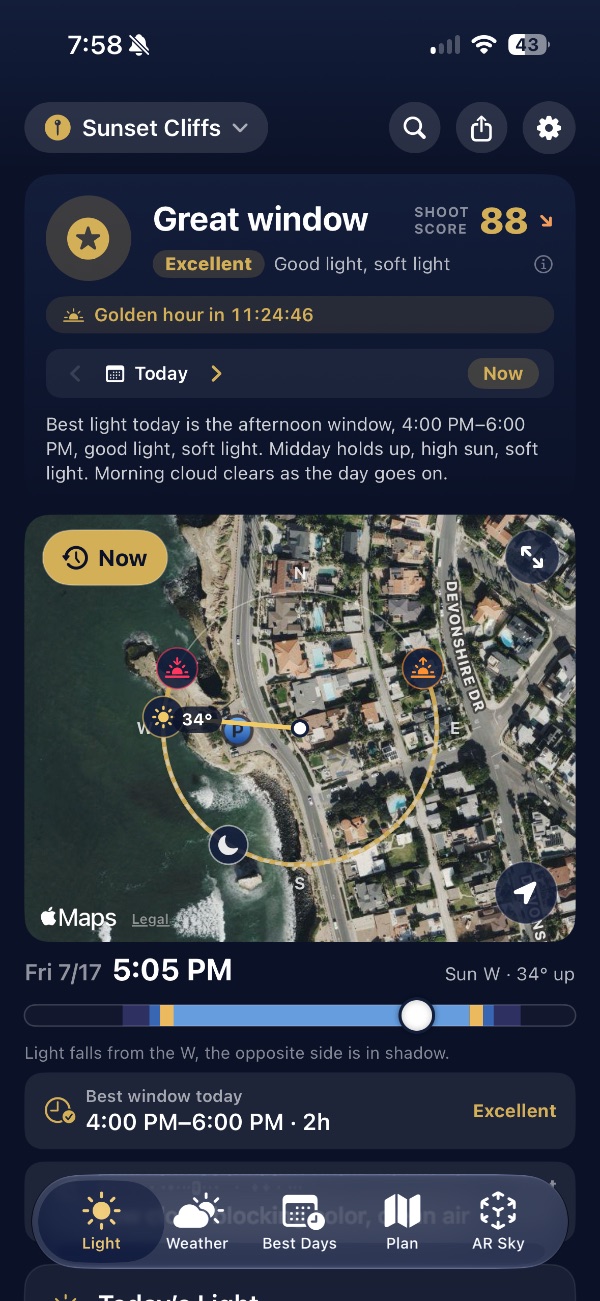
A single 0–100 score and a plain-English verdict (Don't bother → Workable → Good to shoot → Great window) with a trend arrow that tells you whether the next hour gets better, holds, or fades. Tap it for the full "why," the score bands, and what the arrow means. It blends what most tools keep apart: the sun's angle, golden & blue hour and twilight, and the real sky, read cloud layer by layer, plus wind, rain, haze and fog. Low stratus that flattens the sun is penalized; high cirrus that ignites a sunset is rewarded. No juggling. Just: is the light worth shooting?

Don't bother

Flat, blown out, or socked in under a marine layer. Save the drive.

Workable

Shootable with the right subject and expectations. Not the money window.

Good to shoot

A dependable window. Show up and shoot with confidence.

Great window

The kind of light you plan a shoot around. Don't miss it.

Calibrated by a working production company Golden hour Blue hour Cinematic light Landscape Dusk & twilight
What's inside

Everything you need to read the sky, in one place.

Live sun-path map
01 · Light

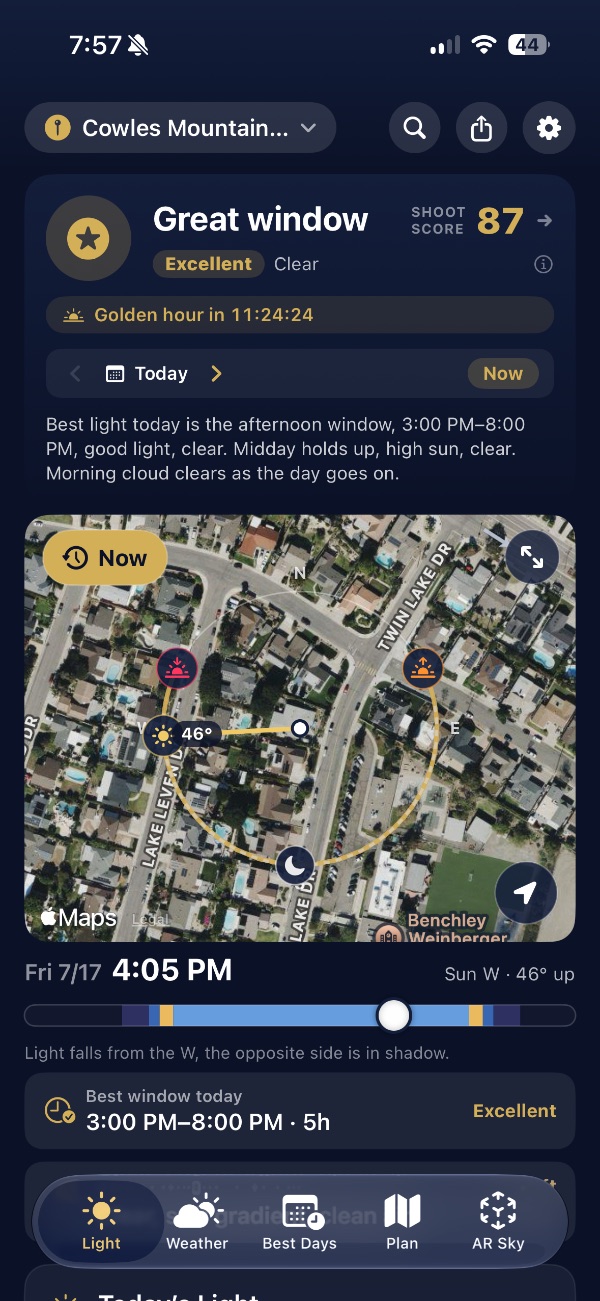
The verdict, over a live sun-path map

A plain-English call, “Best light today is the afternoon window, 5–8 PM”, over a map tracing the sun's exact arc across your location. Tilt into 3D and that arc becomes a glowing gold cone over the real terrain.

  • See which side of your subject is lit, and which is in shadow
  • Scrub the time slider to send the sun to any hour
  • Best window of the day, called out and rated
Golden hour, twilight and sky color
02 · Golden & Blue Hour

Golden, blue & twilight, plus how good the sky will actually be

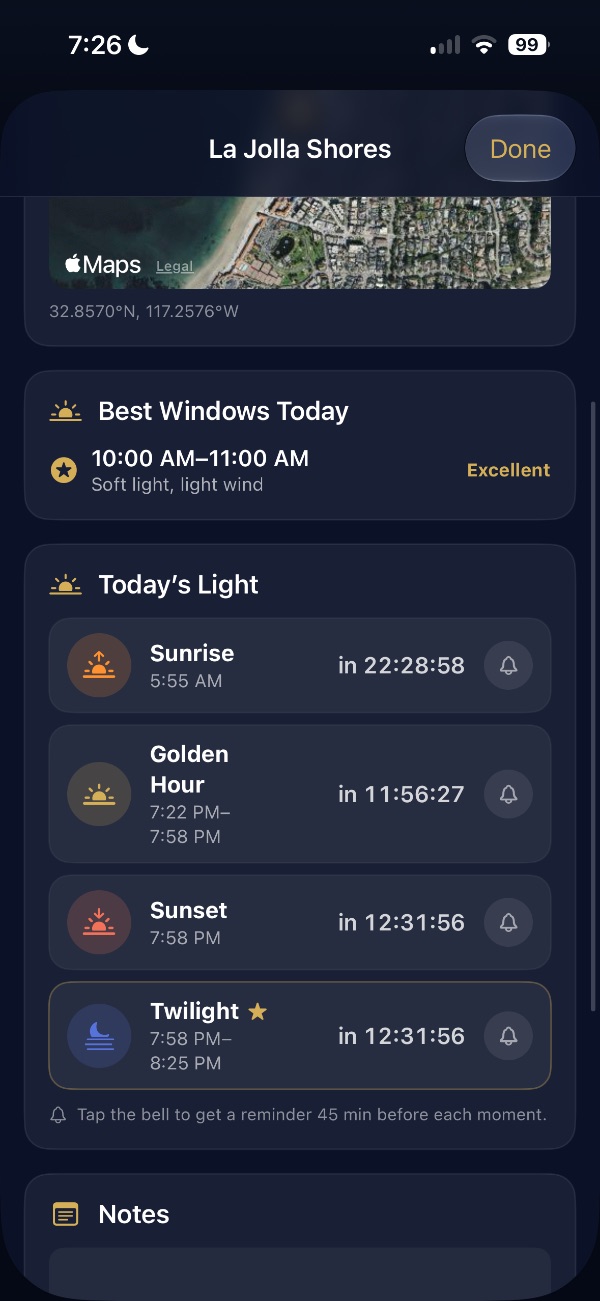
Exact golden hour, blue hour and twilight times for your spot, paired with a sunset color-quality forecast: Soft, Vivid, or Fiery, so you know whether tonight's sky is worth staying for.

  • Precise start/end times, tuned to your location
  • Sunset color rated, with the reason (“too overcast, clean air”)
  • Moonrise, moonset & phase for night shoots
AR Sky
03 · AR Sky

Point your phone up. Watch the light land.

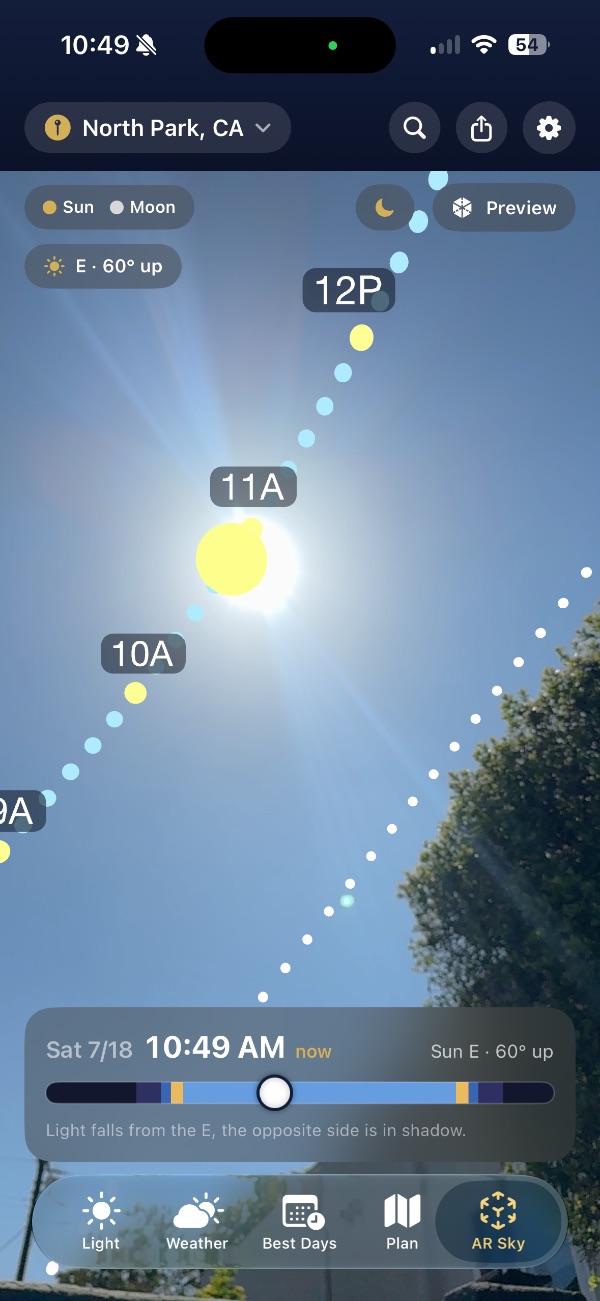
Raise your iPhone and the sun's path appears in augmented reality, right over the real scene, with hourly markers, golden- and blue-hour coloring, and the Milky Way core position for planning night shoots.

  • Stand on location and see exactly where the sun will be
  • Hourly markers along the arc
  • Milky Way core for astro & night work
Best Days outlook
04 · Best Days

A 7-day outlook that star-rates every window

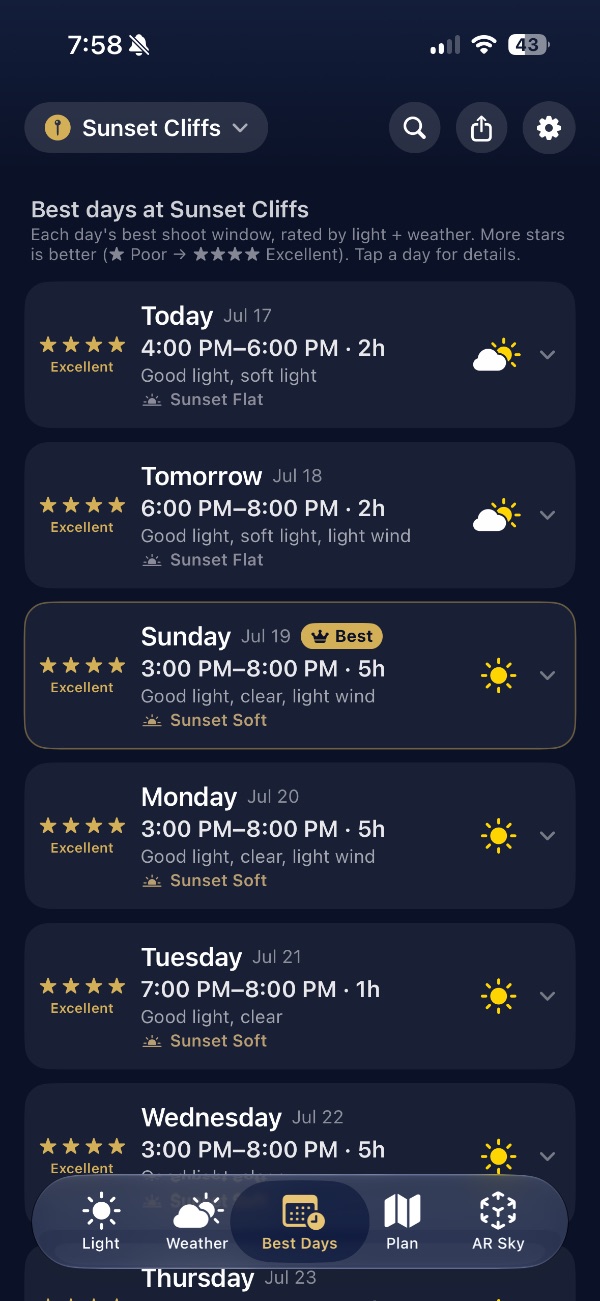
See the week at a glance. ShootLight star-rates each day's best shooting window (light and weather combined) so you can pick the day worth clearing your calendar for.

  • Each day rated one to four stars
  • Best window and expected conditions per day
  • Plan client shoots and scouts around the good light
Shooter's weather, radar and outlook
05 · Weather

Weather that speaks a shooter's language

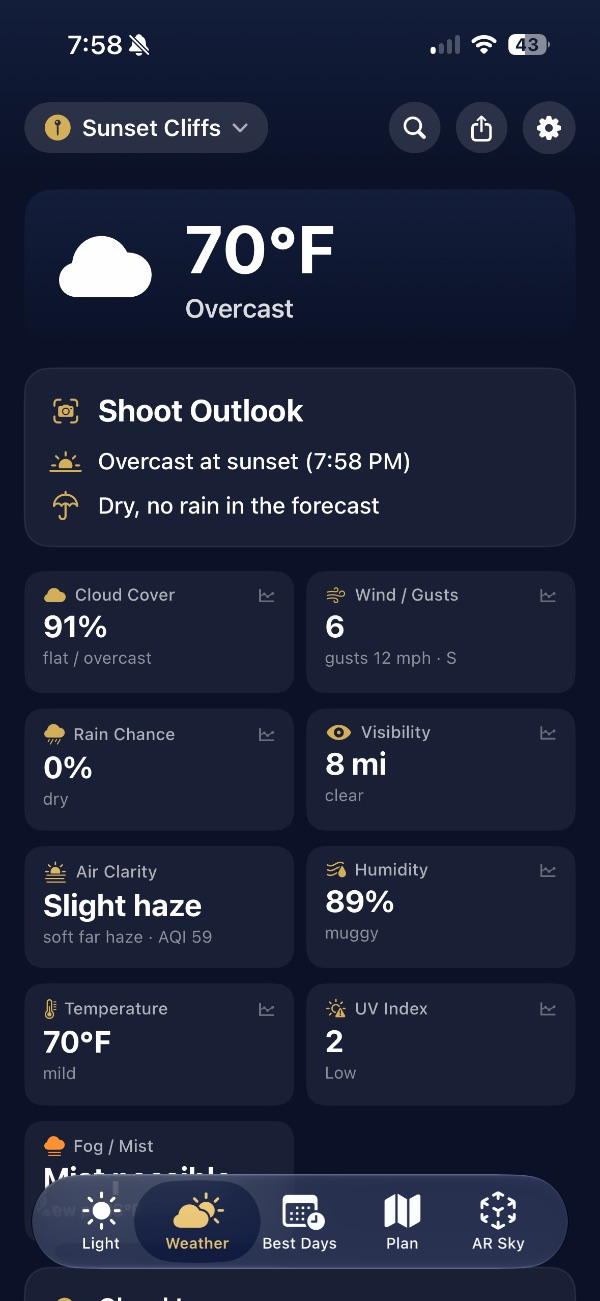
Not a consumer weather app. The metrics a shooter actually reads. Cloud by layer, wind and gusts, rain chance, visibility and haze, humidity, UV and fog risk, each tile opens an hourly chart, alongside a marine-layer burn-off read, cloud radar, and an animated satellite loop.

  • Low / mid / high cloud, not a vague percentage
  • Tap any tile for the hour-by-hour chart of that metric
  • Marine-layer card, precipitation radar, and a satellite cloud loop
  • Powered by Apple Weather + Open-Meteo, with a fallback chain so it never leaves you on a spinner
Shoot plan itinerary
06 · Plan → Brief

Route the day, export a brief your crew can follow

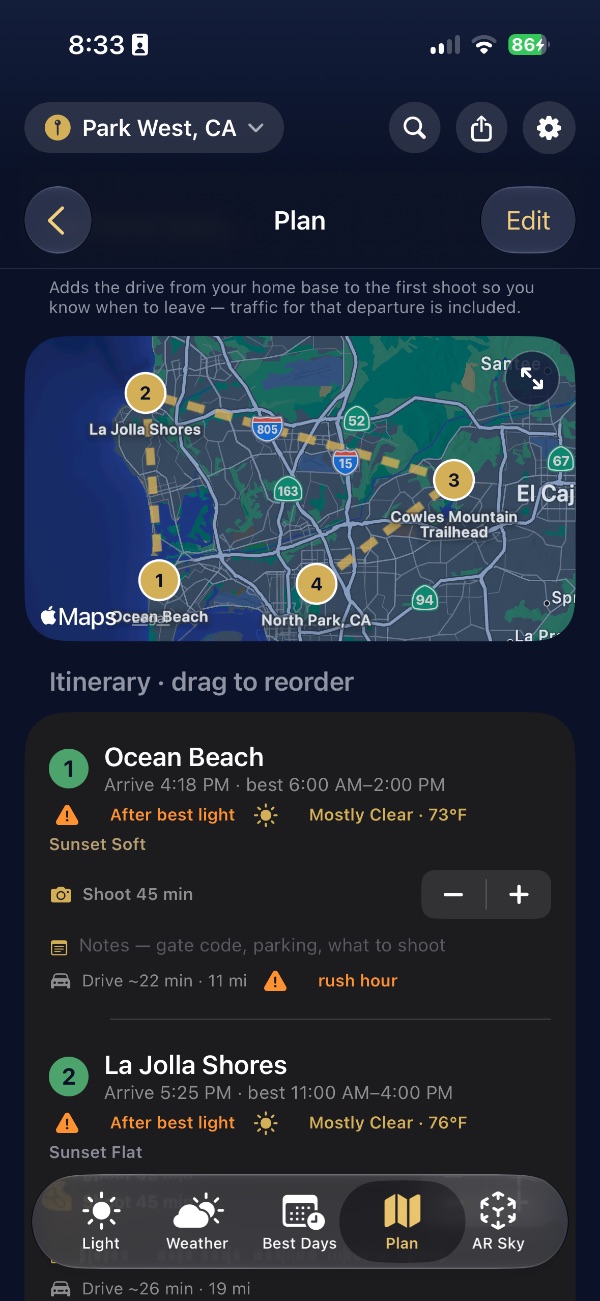
Build a multi-stop shoot day, ordered by best light or fastest drive, with breaks, then export a branded PDF brief a producer can send straight to the shooter.

  • Multi-stop routing by light or by drive time
  • Golden-hour timing baked into every stop
  • One-tap branded PDF the whole crew can read
Shadow Mode

Watch the shadows fall before you load the car.

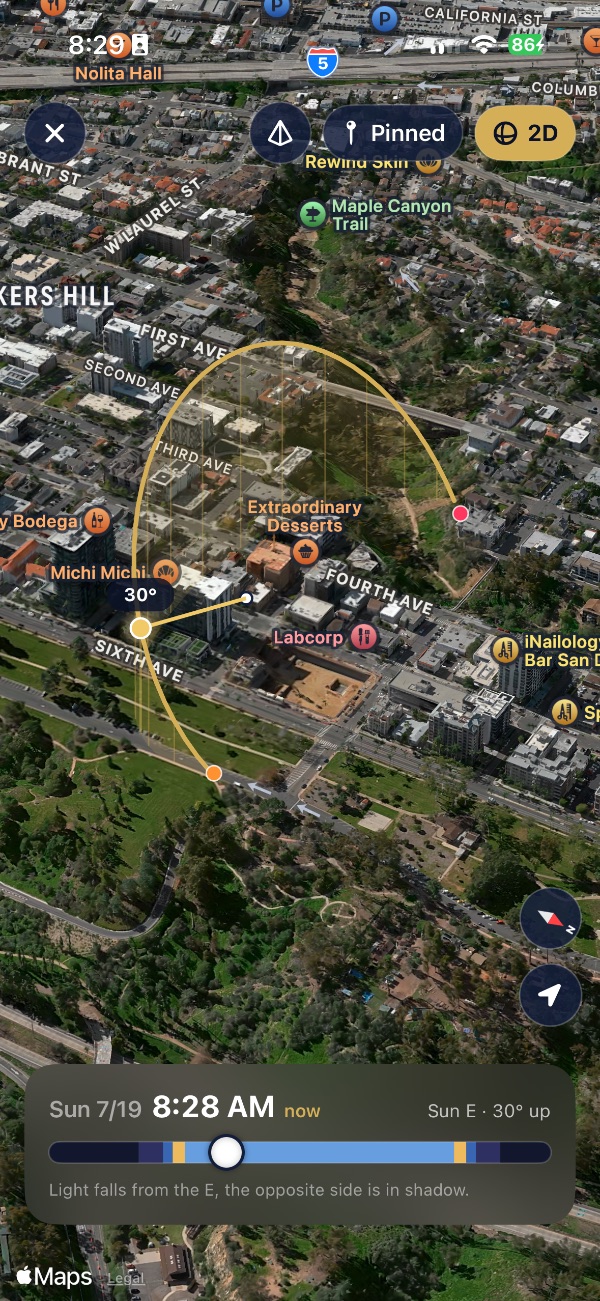
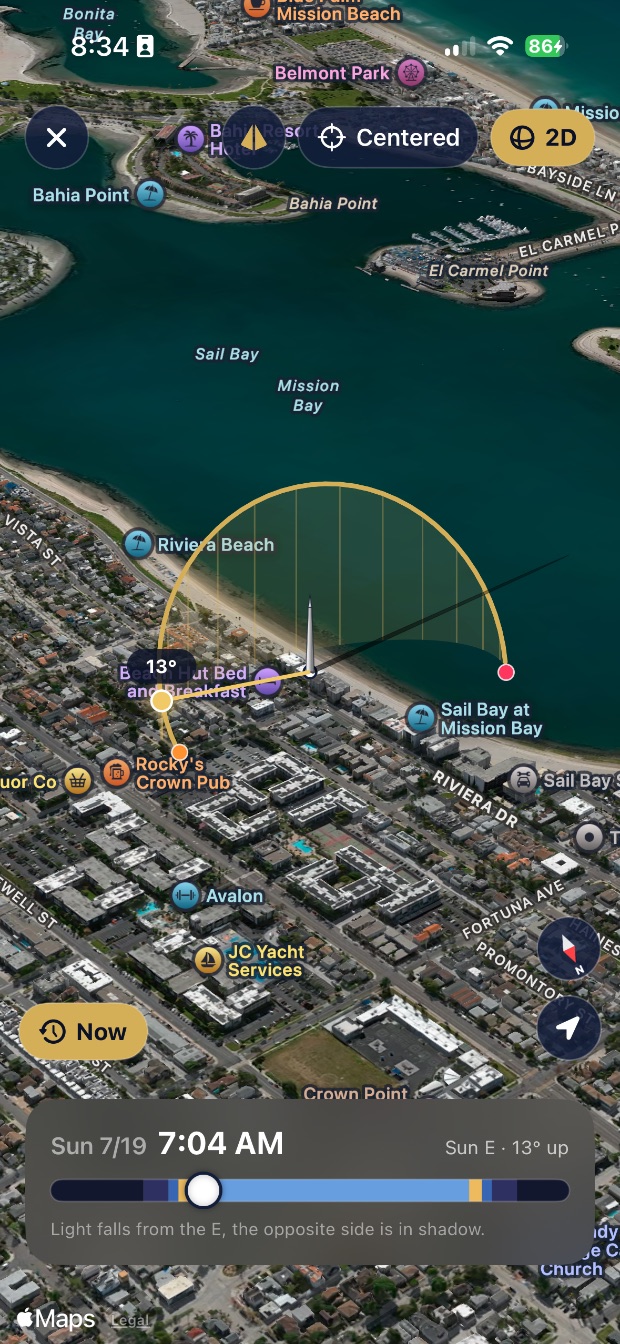
Plant a sundial on the map and ShootLight drops a gnomon that casts a real shadow across the terrain in 3D. Drag the time slider and the shadow stretches long at sunrise, pulls tight at noon, and swings around with the sun, in real time. See exactly how the light will rake your scene, hours before you're standing in it.

  • A real, physically-accurate shadow sweeping across the actual landscape
  • Scrub any hour and watch it stretch, shorten, and rotate live
  • Orbit around it in full 3D to check every angle of your scene
  • Know which wall is lit and which is lost, before you commit the drive
Shadow Mode: the sun's arc and a gnomon casting a real shadow across Mission Bay
Plan → Brief

Route the whole shoot day around the light.

A great shoot day isn't one location. It's five, in the right order, hitting each one when its light peaks. ShootLight sequences the day for you and hands the plan to your crew.

Drop your stops

Pin every location for the day: a client site, an establishing shot, a hero location, a wrap dinner. Search anywhere on Earth or drop pins straight on the map.

Optimize by light or by drive

Let ShootLight order the day so each stop lands in its best window (golden hour at the hero location, blue hour at the cityscape) or flip to fastest drive when the clock rules.

Build in the realities

Add travel time, buffers, setup, and breaks. Every stop shows its own verdict, sun position, and the exact minutes of usable light you'll have on the ground.

Export the branded PDF brief

One tap turns the plan into a clean, branded PDF a producer can send to the shooter, the second unit, or the client: call times, locations, coordinates, and light notes, all in one page.

See a sample brief
Shoot_Brief_Torrey-Pines.pdf
6:38aBlue hour
Torrey Pines · Cliff overlook

Coast-facing. Sun behind ridge, soft even fill.

Fair · workable
7:12pGolden
Black's Beach · Hero shot

Sun low over water. Cone lights the north wall.

Excellent · don't miss
8:04pSunset
La Jolla Cove · Wrap

Vivid sky forecast. Stay 20 min past for afterglow.

Good · reliable
Mode 01

Best light

Orders your stops so each one hits its own golden window, and the whole day wraps by dusk. The default for anyone chasing the good light.

Mode 02

Fastest

Least total windshield time. When you've got more locations than daylight, this gets you through them with the fewest miles between.

Mode 03

Midday

Built around solar noon and kept off the road at rush hour, for commercial work and overcast days when golden hour is moot.

Shoot both golden hours

One toggle splits your stops into a sunrise group and a sunset group, with a suggested midday break, for when you have more spots than one golden hour can hold.

Per-stop shoot time

Dial in how long you'll actually spend at each location and the entire day recalculates instantly: arrivals, drives, breaks and wrap.

Meal breaks that make sense

Set a target for lunch or dinner and it slots into the natural pause between shoots, never mid-shoot. Start too late for that lunch window and it tells you to grab it before you set out, instead of pretending.

Traffic-aware, all day

Drive times use Apple Maps' predicted traffic for the exact hour you'll be on the road (a 5 PM leg comes back slower than the same road at 11 AM), and any leg crossing rush hour gets flagged.

Start from home base

Set your home and the plan factors the traffic-aware drive from your door to the first stop, so it tells you exactly when to leave, not just when to arrive.

Everything is connected

Change one thing (a stop's order, its shoot time, a break, the start, your home base) and the entire day re-solves: arrivals, drives, breaks, wrap, and traffic.

Add to Calendar

Drop the whole shoot day into your calendar (a stop per event plus a “leave for shoot” reminder) or add just tonight's golden hour or sunset.

Notes that travel with you

Gate codes, parking, what to shoot: per-location notes stay with the spot, and a day-level box holds call time, client, crew and gear. All of it lands in the brief.

The day at a glance

An overview bar keeps the whole shoot day in one line: stops, total driving, distance, and the window from first call to wrap.

Shoot Log Sat · La Jolla
Torrey Pines → La Jolla · client scout. Chasing the sunset window.
Conditions logged
Marine layer · 6:40aCalled it. Slept in.
Haze burning off · 10aHeld for later.
Clear window · 7:12pNailed the shot.
High cirrus · sunsetFiery. Stayed late.
Day at a glance
4stops routed
7:12pgolden hour
Vividsky forecast
11 mphNW wind
Golden hour Scout photos Blue hour Wrapped 8:24p
Why we built it

We kept losing shoot days to the sky.

Spearhead Media is a working production company. ShootLight started as the tool we wished we had on our own shoots.

We'd scout a location, block the day around golden hour, drive an hour out, and watch a marine layer flatten the light the moment it mattered. Or we'd nail the light and get grounded by wind we didn't see coming. The information existed, scattered across three weather apps, a golden-hour calculator, and a hunch. Nothing put it together and just told us whether to go.

So we built the thing that would: one honest score from the light and the weather, the actual sun on the actual terrain, and a planner that routes the whole day around the good light. Every default is tuned the way a crew actually thinks, because it's the tool we reach for first.

And the details

The small things serious shooters actually use.

Moon phase & timing

Moonrise, moonset and phase for every night. Plan around a dark sky for astro or a full moon for its own light.

Milky Way core

Core rise, set, and position overlaid in AR Sky. Line up the galactic center over your foreground before you ever leave home.

Shadow direction

See exactly which way shadows fall at any hour. Know before you arrive whether your subject's face is lit or lost.

Golden-hour alerts

Get a nudge before the best window opens at your saved locations, so you never look up and realize you missed it.

Saved locations

Keep your go-to spots and upcoming scouts one tap away, each with its own live score and best-days outlook.

Any date, any place

Because sun & moon are pure astronomy, scout a location for a shoot six months out with minute-accurate light.

Why it's different

Not a golden-hour clock. A production tool.

01

Light and weather, as one score

The only tool that grades the sun and the sky together, with cloud-layer nuance a generic forecast can't see.

02

The actual light on the actual terrain

A 3D sun path and real-time Shadow Mode show where the light comes from and how it rakes your scene.

03

A real production planner

Traffic-aware routing, meal breaks, home base, golden-hour splits, and a share-ready PDF brief.

04

Built by a working crew

Made by Spearhead Media, a production company. Every score and default tuned on real shoots.

“

We built this because we kept losing shoot days to bad light. ShootLight is the tool we wanted in our own bag: one honest answer before we ever load the car.

Made by Spearhead Media, a working production company
Every score and default tuned the way a real crew thinks.

The honest offline story

The light works offline. Weather needs a signal.

Sun and moon position, sunrise & sunset, golden hour, blue hour, twilight, moon phase and Milky Way timing are all computed on your device: no signal required, anywhere you drive. Weather, radar, maps, and traffic-aware routing need a connection; your last weather fetch is cached, so recent conditions still show when the bars disappear.

On-device astronomySun & moon math computed locally, no server round-trip.
Weather, cachedYour last fetch stays available the moment you drop offline.
Zero bars neededThe light plans anywhere on Earth: canyon, coast, backcountry.
Who it's for

Built by shooters, for shooters.

If your work lives and dies by the light, ShootLight is the planning tool you've been improvising.

Photographers

Show up when the light is right

Landscape, portrait, wedding, travel, astro: scout a location before you commit the drive, nail golden hour to the minute, and read whether tonight's sunset is worth the wait.

Videographers & Crews

Plan the day, brief the team

Route a multi-stop shoot around the best light, check wind and gusts before you set out, know if it'll clear by sunset, and hand every crew member a PDF brief that says exactly where to be and when.

Launch pricing

One app. One price. No subscription.

ShootLight is a single up-front purchase: buy it once, own it, and every update is included. No monthly fee for the sky.

  • Pay once, keep it forever: no subscription, ever
  • Every feature on this page, plus all future updates
  • Sun & moon planning works offline; weather needs a signal
  • Made and maintained by a working production company
One-time purchase
$9.99 one-time · no subscription

A single purchase on the App Store. No in-app purchases, no ads, and every update included.

Download on the App Store

Want to hear about new features? Leave your email.

You're on the list.

iPhone · iOS 17 or later

Questions

Good to know before you go.

How does the “shoot score” actually work?
ShootLight fuses the sun's angle and path, golden & blue hour, cloud layers, wind, haze and air clarity, and a predicted sunset color into a single verdict (Don't bother, Workable, Good to shoot, or Great window) for that exact location and moment. It's not a generic weather rating; it's tuned to what actually makes light worth shooting.
Does it work offline?
The light does. Sun and moon position, golden hour, blue hour, twilight, Shadow Mode, and Milky Way timing are all computed on your device with no signal, great for remote locations. Weather, radar, maps, and traffic-aware routing need a connection; your last weather fetch is cached, so recent conditions still show when you lose service.
Can I plan shoots months in advance?
Absolutely. Because the sun and moon are pure astronomy, ShootLight can tell you golden hour, the sun's path, and Milky Way position for any date and any location on Earth, perfect for planning a shoot months out. Weather-based scoring sharpens as the date approaches.
What's the difference between the map and AR Sky?
The live sun-path map traces the sun's arc from a top-down view of your location, with a time slider and 3D terrain. AR Sky lets you stand on location, raise your phone, and see the sun's path overlaid on the real scene in augmented reality, with hourly markers and the Milky Way core.
How much is it, and is there a subscription?
ShootLight is a one-time purchase of $9.99 on the App Store. No subscription, no in-app purchases, no ads. You buy it once, own it, and every future update is included.
Where do I get it, and what do I need?
ShootLight is on the App Store now for iPhone, and needs iOS 17 or later. AR Sky uses your camera; everything else works without it.
How accurate is the sunset color forecast?
ShootLight predicts sunset quality (Soft, Vivid, or Fiery) from the mix of high, mid, and low cloud, air clarity, and where the sun sets relative to that cloud. Like any forecast it sharpens closer to the day, but it's built to answer the real question: is tonight worth staying for, or should you pack up?
Can it optimize a multi-stop shoot day?
Yes, that's what Plan → Brief is for. Drop every location for the day and ShootLight sequences them either by best light (each stop lands in its peak window) or by fastest drive, with travel time, buffers, and breaks factored in. Every stop shows its own verdict and usable minutes of light.
What's in the exported PDF brief?
A clean, branded one-pager: call times, each location with coordinates, the light verdict and sun position per stop, golden/blue-hour timing, and your notes. It's designed so a producer can send it straight to a shooter, second unit, or client without any extra formatting.
Does AR Sky need a special phone or LiDAR?
No LiDAR required. AR Sky uses your iPhone's camera and motion sensors to overlay the sun's path on the real scene. Any iPhone on iOS 17+ can run it; newer phones just track a touch more smoothly.
How is this different from a golden-hour app?
A golden-hour app tells you when the light turns warm. ShootLight tells you whether it's worth showing up at all, fusing the sun with live cloud, wind, haze, rain timing, and sunset color into one verdict, then helping you plan and brief the entire day around it.
Will there be a subscription?
No. ShootLight is a single up-front purchase of $9.99 with every update included, no recurring fee.
Is there an iPad version?
ShootLight is designed for iPhone, and AR Sky is built around holding it up to the sky.
Where does the weather data come from?
Sun and moon positions are computed on-device from a proven astronomy model, so they never need a connection. Live conditions come from Apple Weather and Open-Meteo, with MET Norway as a backup source, radar from RainViewer, and satellite imagery from NASA GIBS, a fallback chain so you're never stuck on a spinner.
Why did it rate a clear midday as only “Good” and not “Great”?
Golden hour still scores highest: low, warm, directional light is ideal. A clear midday is a genuinely usable window, just harsher and flatter, so it rates well but not top. Overcast, on the other hand, is never rated a “Great window”; it's scored as the flat, dead light it is.

ShootLight app icon

Read the sky. Shoot the moment.

Stop juggling apps and guessing at the light. ShootLight is on the App Store now.